Skip to content

GiftTracker vs Santa's Bag: feature comparison

Santa's Bag is a long-running Christmas gift planner for iPhone. GiftTracker does the same job on both iPhone and Android, without ads.

The closest thing to a like-for-like comparison

Most gift apps are wish lists. Santa’s Bag is built for the person doing the buying, the same as GiftTracker, and its App Store listing carries a long list of press mentions.

So the differences are narrower here, and they are mostly about the platform, the ads and how the two handle a year that is not December.

Where Santa’s Bag is strong

Budgets are the part it clearly does well: its listing describes budgets for both the recipient and the occasion, with progress bars.

The output options are unusual and genuinely useful: checkable planning and shopping lists you can print or email, which suits anyone who would rather shop from paper. Splitting a gift across several recipients is another detail most apps skip. And the sorts and filters are, by the listing’s own description, highly customisable.

Where GiftTracker is different

The first difference is which phone you own. Santa’s Bag is an Apple app; we found no Android version when we searched. GiftTracker is on both the App Store and Google Play, which matters if the household is mixed or you are likely to change phone.

The second is ads. Santa’s Bag is free with banner ads, and removing them is a £4.99 purchase. GiftTracker has no ads to remove, no subscription and no in-app purchases.

The third is the rest of the year. Santa’s Bag is a Christmas app by name and by design: its listing leads with Christmas shopping and a countdown timer. GiftTracker treats Christmas as one Event among birthdays, Mother’s Day, Father’s Day and anything else, saves ideas that are not attached to an occasion yet, and moves finished events into an archive so you can see what somebody had from you last time.

Two smaller differences follow. Gifts in GiftTracker move through To Buy, Bought and Wrapped, and you can add statuses of your own. And once you are set up it works with no connection at all, syncing when you are back.

Which one fits you

If you have an iPhone, plan for Christmas and like a printed shopping list, Santa’s Bag is a well-made app that has earned its reputation, and the ad removal is a one-off rather than a subscription.

If you are on Android, or you want the same list to carry birthdays through the year without ads, GiftTracker is the closer fit. How to keep track of birthday gifts all year is the habit it is built around.

Point by point

Every comparison on this site answers the same 8 questions in the same order, so a page cannot pick the ones its subject happens to win.

Who we think each suits. Santa's Bag: An iPhone or iPad owner who wants a Christmas plan they can print or email, and does not mind paying once to remove the ads. GiftTracker: The person doing the buying: a list of people, a budget to keep to, and gifts to get from an idea to wrapped.

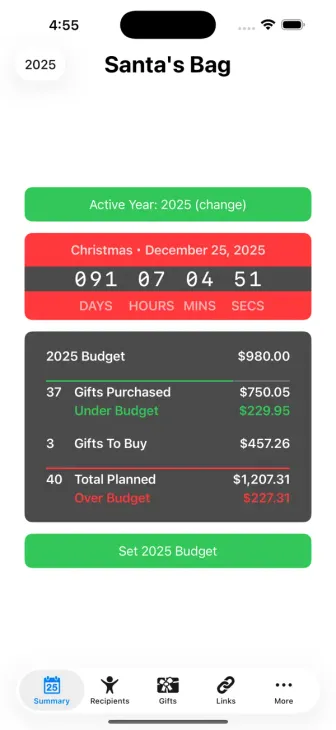
The first screenshot Santa's Bag publishes on its own App Store listing.

Santa's Bag's own lead store screenshot, reproduced unedited. It is the developer's marketing rather than ours, which is the point of showing it.

Where it runs

GiftTracker

The App Store and Google Play. iPhone running iOS 16 or later, or an Android phone running Android 7.0 or later. There is no browser version.

Santa's Bag

The App Store only, covering iPhone, iPad and Apple Vision. We found no Google Play listing when we searched on 5 September 2026.

What it costs

GiftTracker

Free. No subscription and no in-app purchases.

Santa's Bag

Free with in-app purchases. Removing the banner ads is listed at £4.99, alongside optional tips to the developer.

Ads

GiftTracker

None.

Santa's Bag

Banner ads, removable through that in-app purchase.

Using it without a connection

GiftTracker

Once you're set up, the whole app works offline, and your changes sync as soon as you're back.

Santa's Bag

Its listing does not mention using the app without a connection, and describes a database backup and restore rather than a sync.

How the lists are organised

GiftTracker

An Event for each occasion, the Recipients you are buying for inside it, and their gifts on each Recipient. Finished events move to your archive rather than disappearing.

Santa's Bag

Recipients with their gifts, ideas, links, preferences and notes, gathered under an occasion.

Tracking what you've bought

GiftTracker

Gifts move through To Buy, Bought and Wrapped, and you can add your own statuses when those do not match how you shop.

Santa's Bag

Its listing describes planning and shopping lists you can tick off, print or email, with customisable views, sorts and filters, rather than named stages for a gift.

Budgets

GiftTracker

Set a budget for an Event and share it out between Recipients. GiftTracker keeps a running total of what you have spent and what is still to buy.

Santa's Bag

Recipient and occasion budgets with progress bars.

Sharing lists and gift exchanges

GiftTracker

Built for the person doing the buying, so there are no shared wish lists, no invitations and no Secret Santa draws.

Santa's Bag

Not a shared-list app. Lists leave by email or printout, and a screenlock passcode keeps them private on the phone.

What we checked, and when

Santa's Bag is published by Clay Pot Software LLC. We read these listings on 5 September 2026 and have not repeated anything from a review site or a press article. Store listings change without notice, so a claim here is a claim about that day.

  • App Store listinghttps://apps.apple.com/gb/app/santas-bag/id397698040

Maintained by GiftTracker team. Last reviewed 5 September 2026.

App names are the trademarks of their owners. GiftTracker is not affiliated with, endorsed by, or sponsored by Clay Pot Software LLC.

Try GiftTracker for yourself

Free on iPhone and Android, with no ads or subscription.